[ jQuery 시작하기 ]
- jQuery란?
HTML의 요소들을 조작하는, 편리한 Javascript를 미리 작성해둔것. 라이브러리!
jQuery는 Javascript와 다른 특별한 소프트웨어가 아니라 미리 작성된 Javascript 코드.
전문 개발자들이 짜둔 코드를 잘 가져와서 사용하는 것. (사용하기 전에 "임포트"를 해야함!)
- jQuery와 Javascript 코드 비교해 보기
HTML의 요소들을 조작하는, 편리한 Javascript를 미리 작성해둔것. 라이브러리!
document.getElementById("element").style.display = "none";$('#element').hide();
- jQuery 사용하기
미리 작성된 Javascript 코드를 가져오는 것을 import라고 함.
https://www.w3schools.com/jquery/jquery_get_started.asp
jQuery Get Started
W3Schools offers free online tutorials, references and exercises in all the major languages of the web. Covering popular subjects like HTML, CSS, JavaScript, Python, SQL, Java, and many, many more.
www.w3schools.com
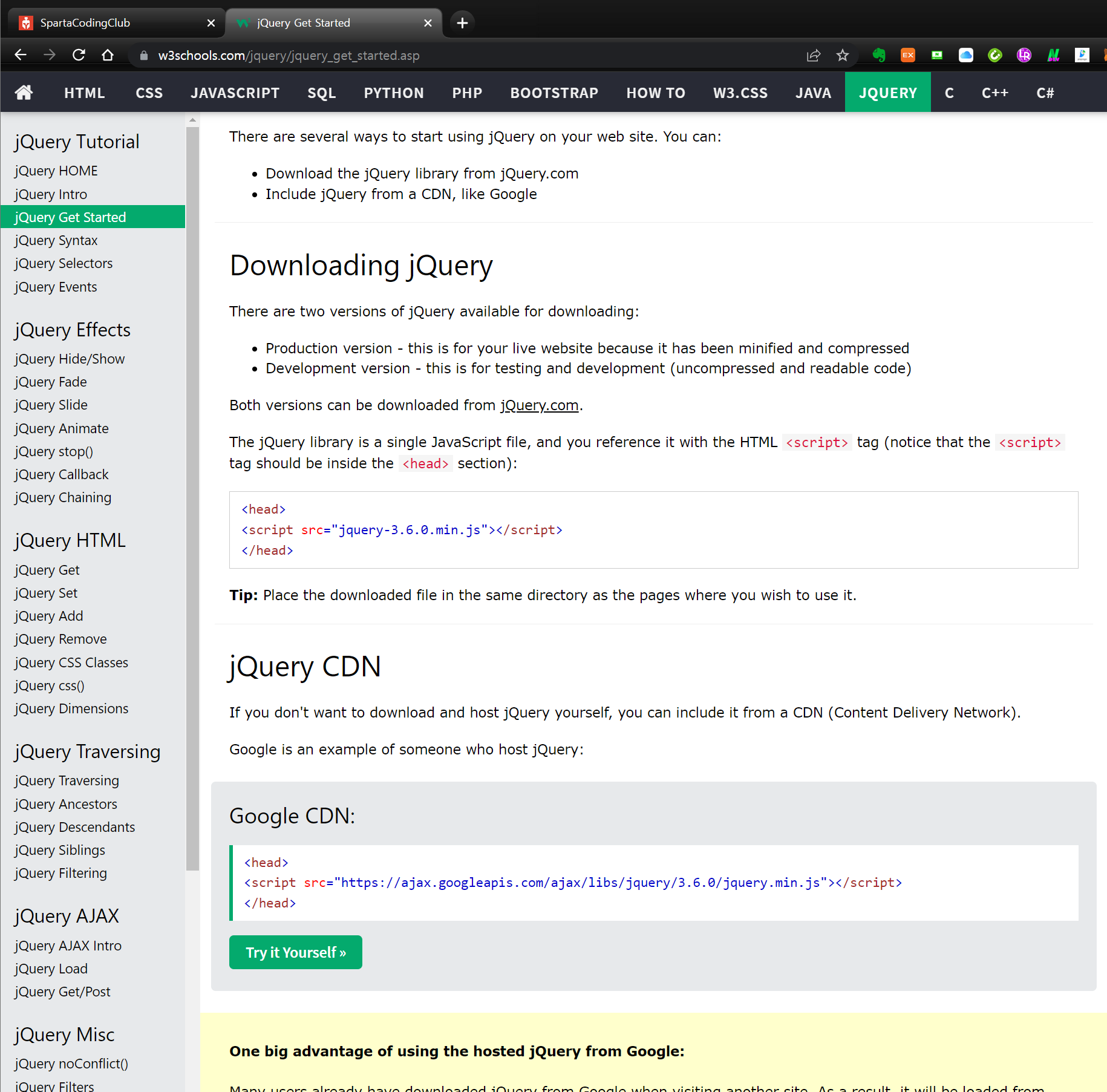
위 링크의 Google CDN을 가져다 사용하면 됨. import 방법은 아래와 같이 <head></head> 사이에 위치함.
<head>
<script src="https://ajax.googleapis.com/ajax/libs/jquery/3.6.0/jquery.min.js"></script>
</head>
css와 마찬가지로, jQuery를 쓸 때에도 "가리켜야" → 조작할 수 있음.
예) 특정 인풋박스의 값을 → 가져와줘!
예) 특정 div를 → 안보이게 해줘!
css에서는 선택자로 class를 썼으나 jQuery에서는 id 값을 통해 특정 버튼/인풋박스/div/.. 등을 가리키게 됨.
[ jQuery 다뤄보기 ]
- 자주쓰는 jQuery들 다뤄보기
jQuery를 모두 외울 필요 없음. 필요할 때 google에서 가져다 쓰자..
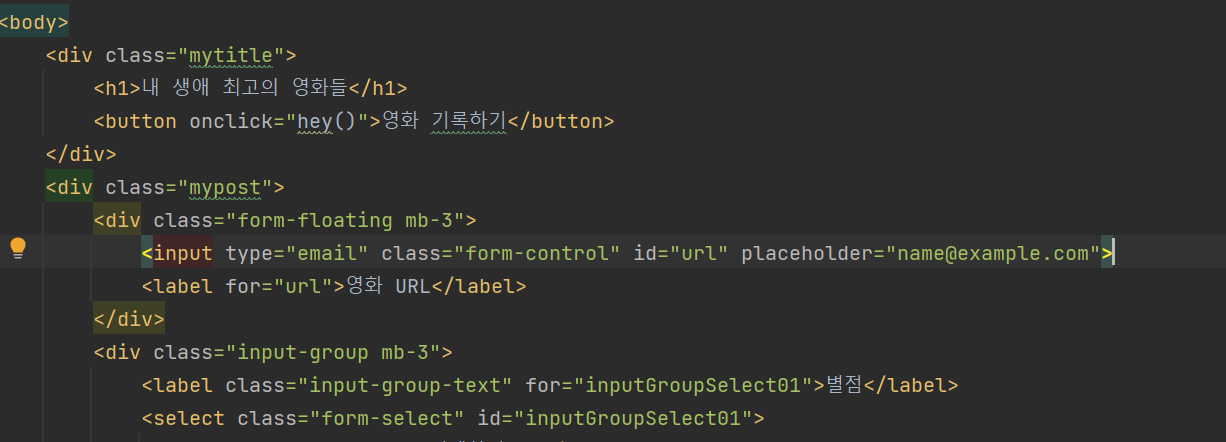
특정 HTML 요소에 id 값을 부여후, DevTools와 같은 웹브라우저 개발 도구의 console에서 직접적으로 변수를 처리 할 수 있다.
input 요소에 id를 url 로 부여.
변수를 지정하고 해당 변수에 값 입력해서 반영하기
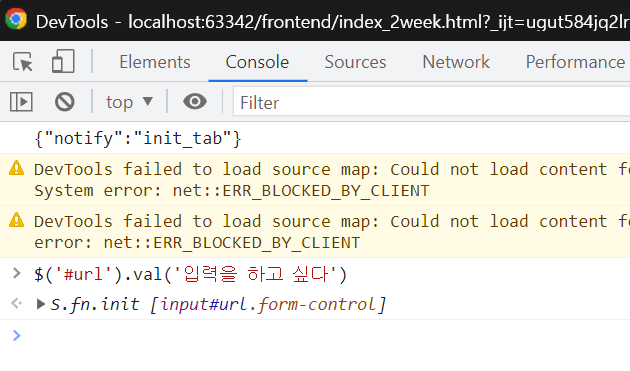
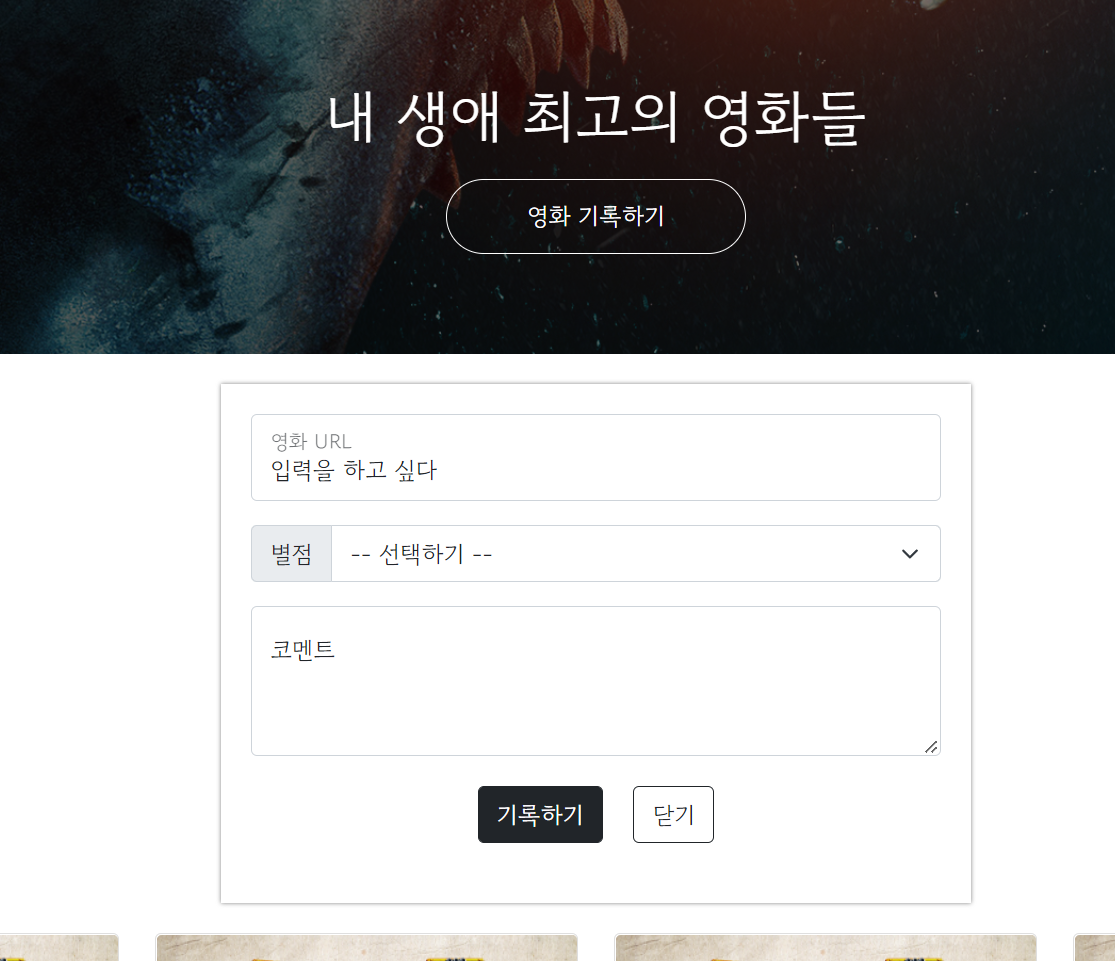
지정된 변수의 값 가져오기
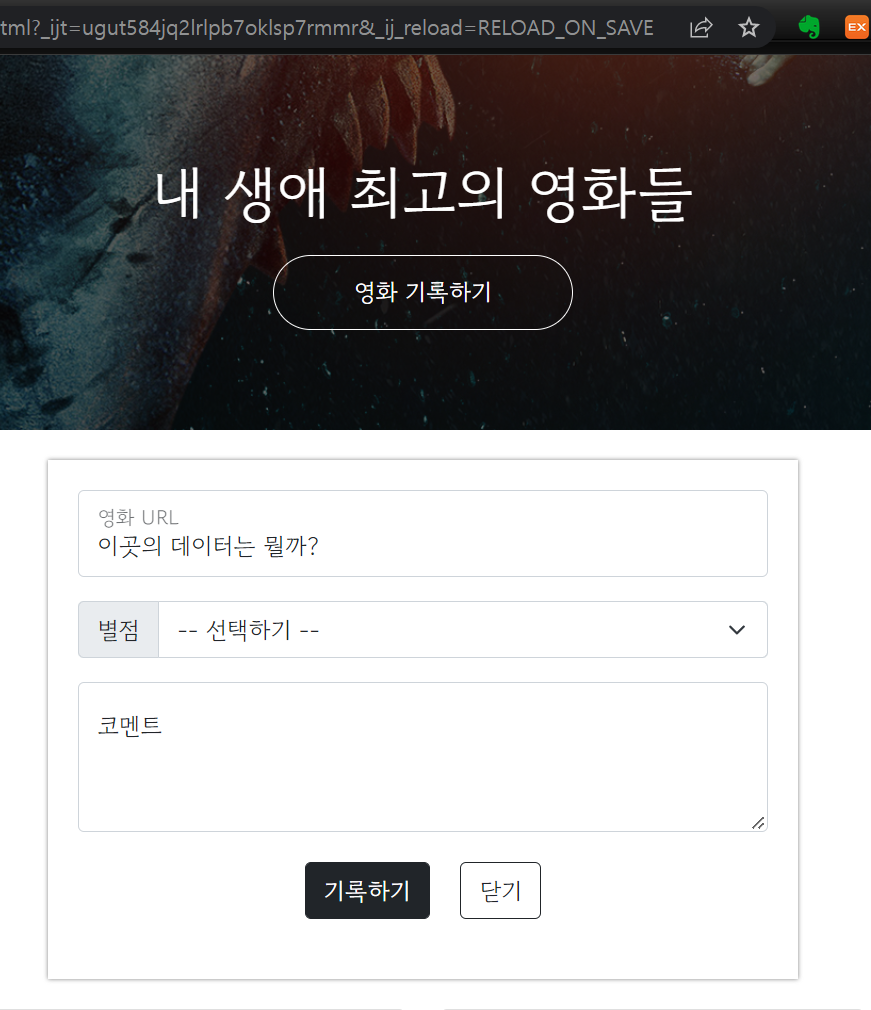
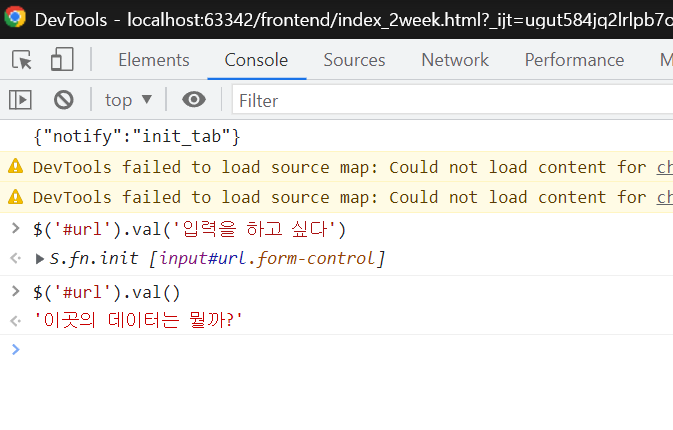
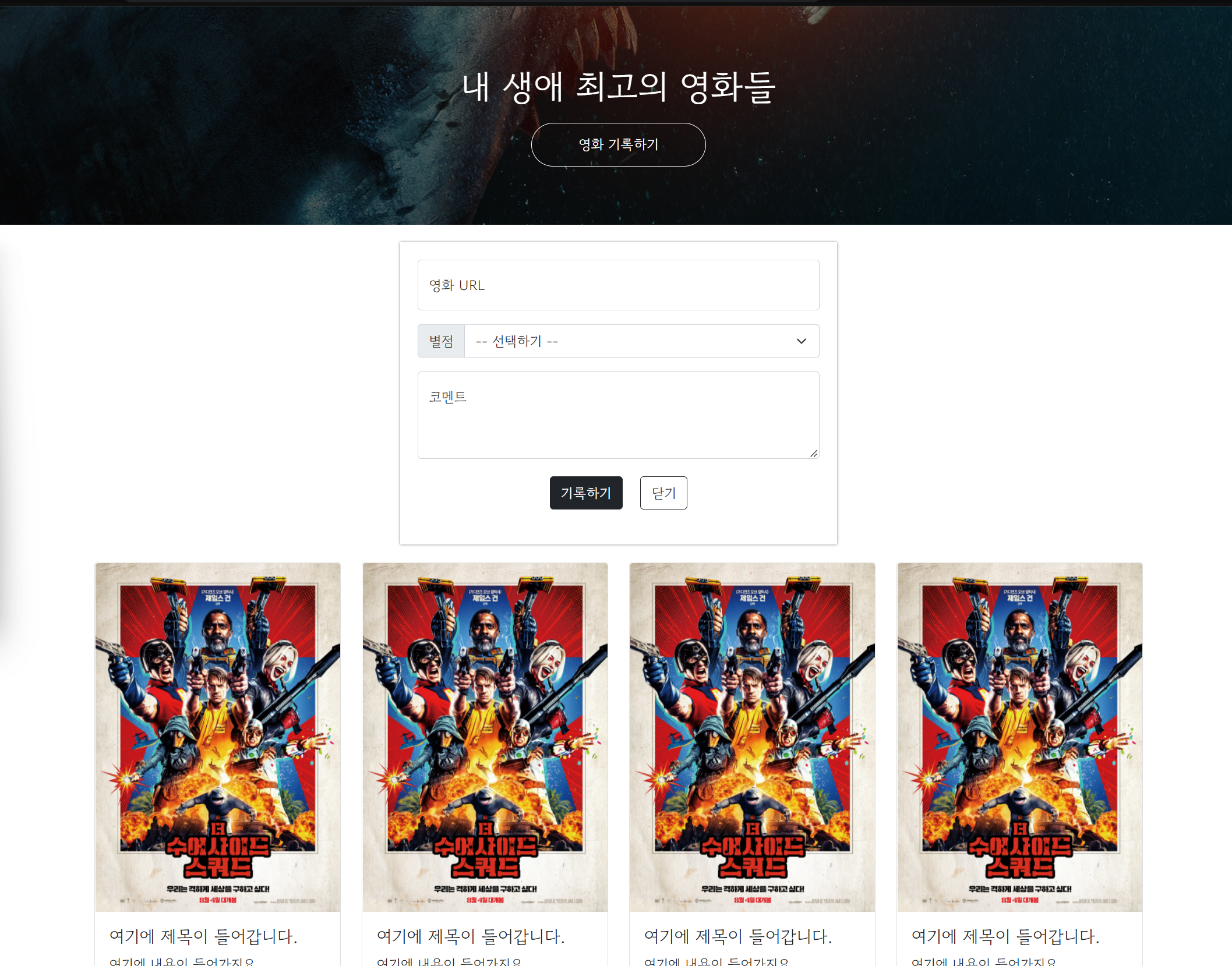
Postbox에 ID 부여 후 콘트롤 하기
기존의 class 값만 있는 mypost에 id post-box를 입력해서 id를 부여한다.

DevTools에서 post-box id를 가진 요소에 $('#post-box').hide() 명령을 수행

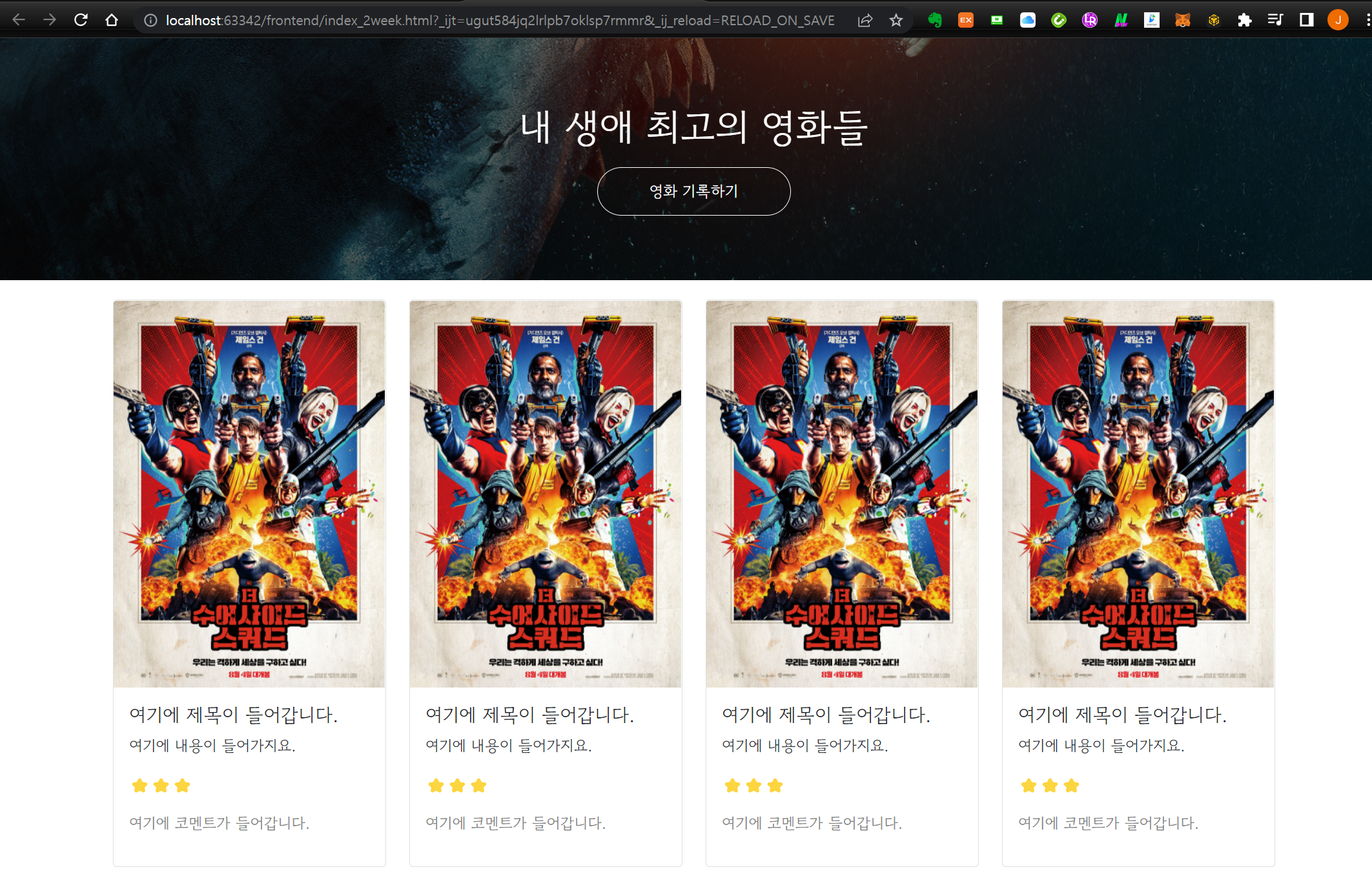
DevTools에서 post-box id를 가진 요소에 $('#post-box').show() 명령을 수행하면 반대로 나타내게 된다.
Card box 목록을 제어해 보자.
Card box 목록 부분에 id를 cards-box로 부여
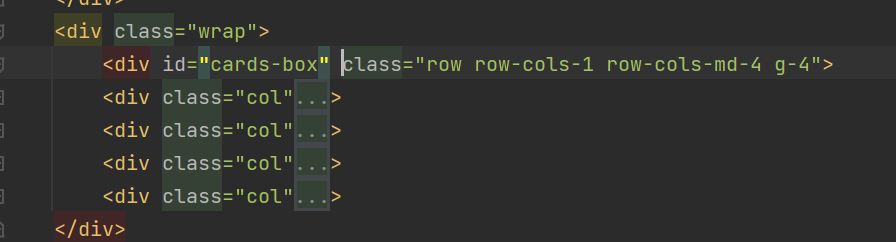
DevTools의 Console에서 아래와 같이 수행하면.
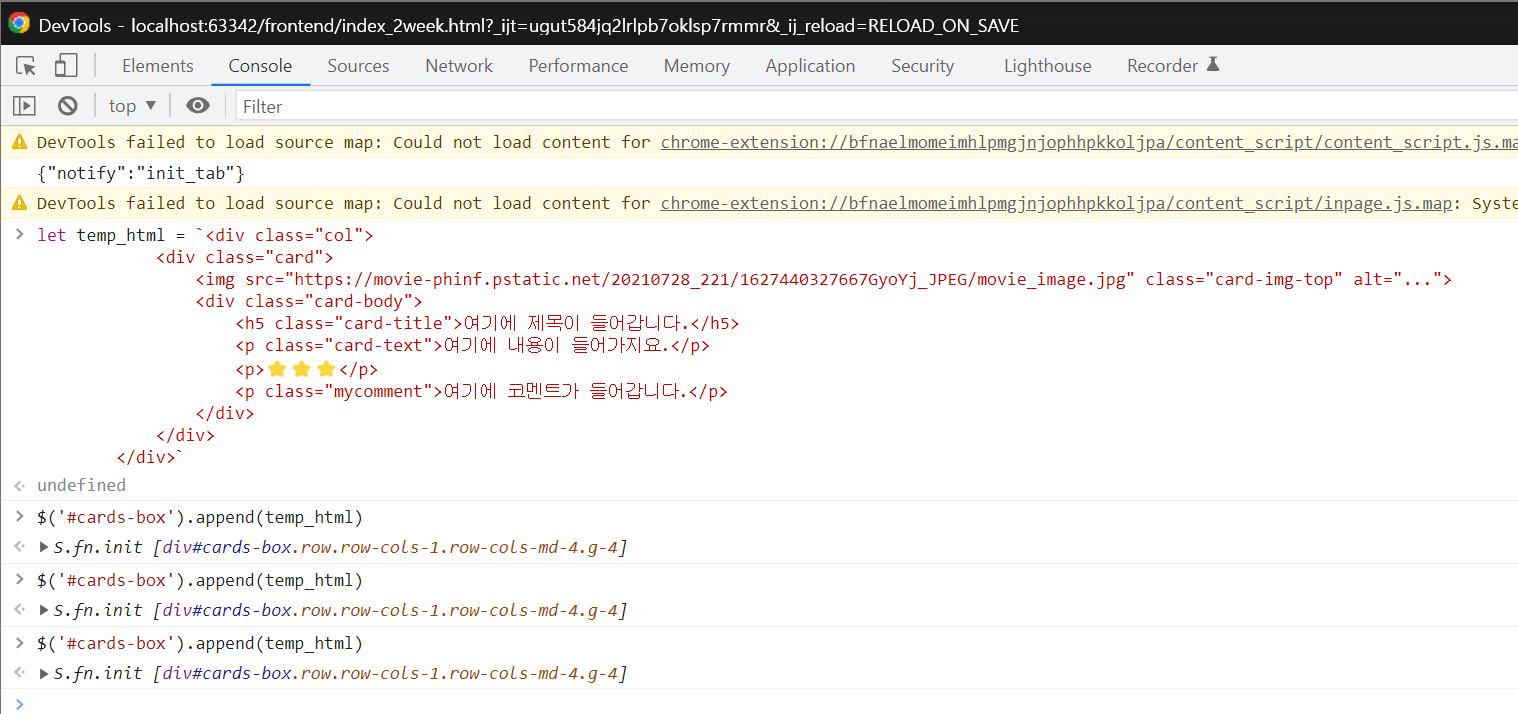
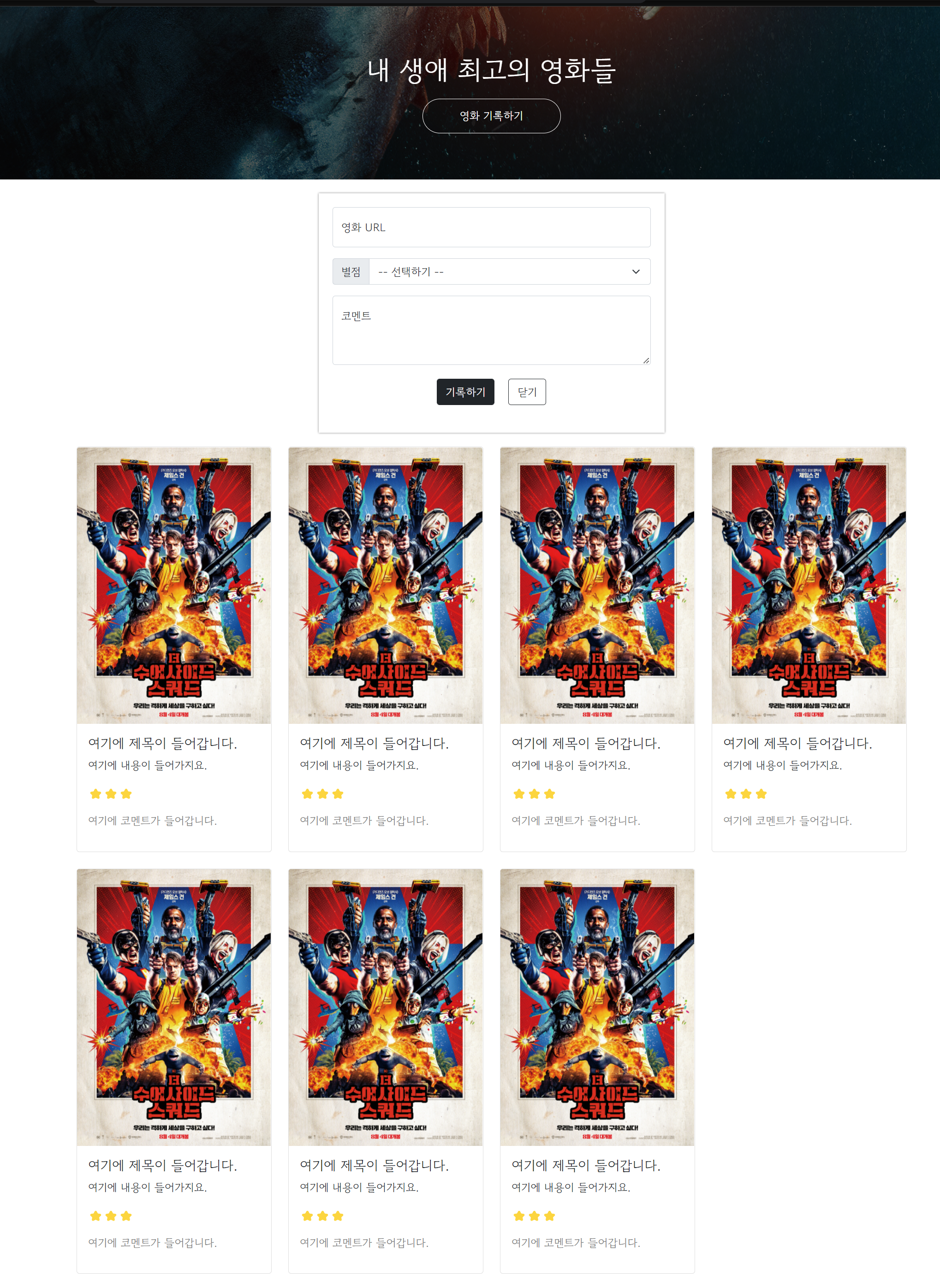
[ jQuery 적용하기 ]
- 포스팅 박스 열기/닫기 기능을 붙여보기
예시 미리보기
http://spartacodingclub.shop/web/movie
해당 주차의 최종 테스터 버전 보기 (해당 주차의 완성된 버전)
'영화 기록하기' 버튼을 누르면 숨겨진 창이 나타나고, '닫기'를 누르면 없어짐.
스파르타 피디아
더 수어사이드 스쿼드 살고 싶다면 무조건 성공시켜라!최강 우주 빌런에 맞선, 자살특공대에게 맡겨진 ‘더’ 대책 없는 작전.... ⭐⭐⭐
spartacodingclub.shop
- 포스팅 박스 열기(영화기록하기) 버튼에 function을 달기 (alert 메세지로만 표시)
# <script> 태그 그룹내 아래 스크립트 수행
function open_box(){
    alert('열린다!')
}
function close_box(){
    alert('닫힌다!')
}


<button onclick="open_box()">영화 기록하기</button>

<button onclick="close_box()" type="button" class="btn btn-outline-dark">닫기</button>
- 포스팅 박스 열기 버튼(영화기록하기 버튼)과 닫기 버튼에 function을 달기
function open_box(){
    $('#post-box').show()
}
function close_box(){
    $('#post-box').hide()
}
- 처음부터 포스팅 박스 감춰진 상태로 표현하기
기존 .mypost class의 CSS 부분에 display: none; 를 수행하면 처음에는 화면에 표현하지 않음.
.mypost {
    width: 95%;
    max-width: 500px;
    margin: 20px auto 0px auto;
    padding: 20px;
    box-shadow: 0px 0px 3px 0px gray;

    display: none;
}
[ jQuery 연습하기 ]
- 특정 데이터의 값 불러오기 및 조정, 변경하기
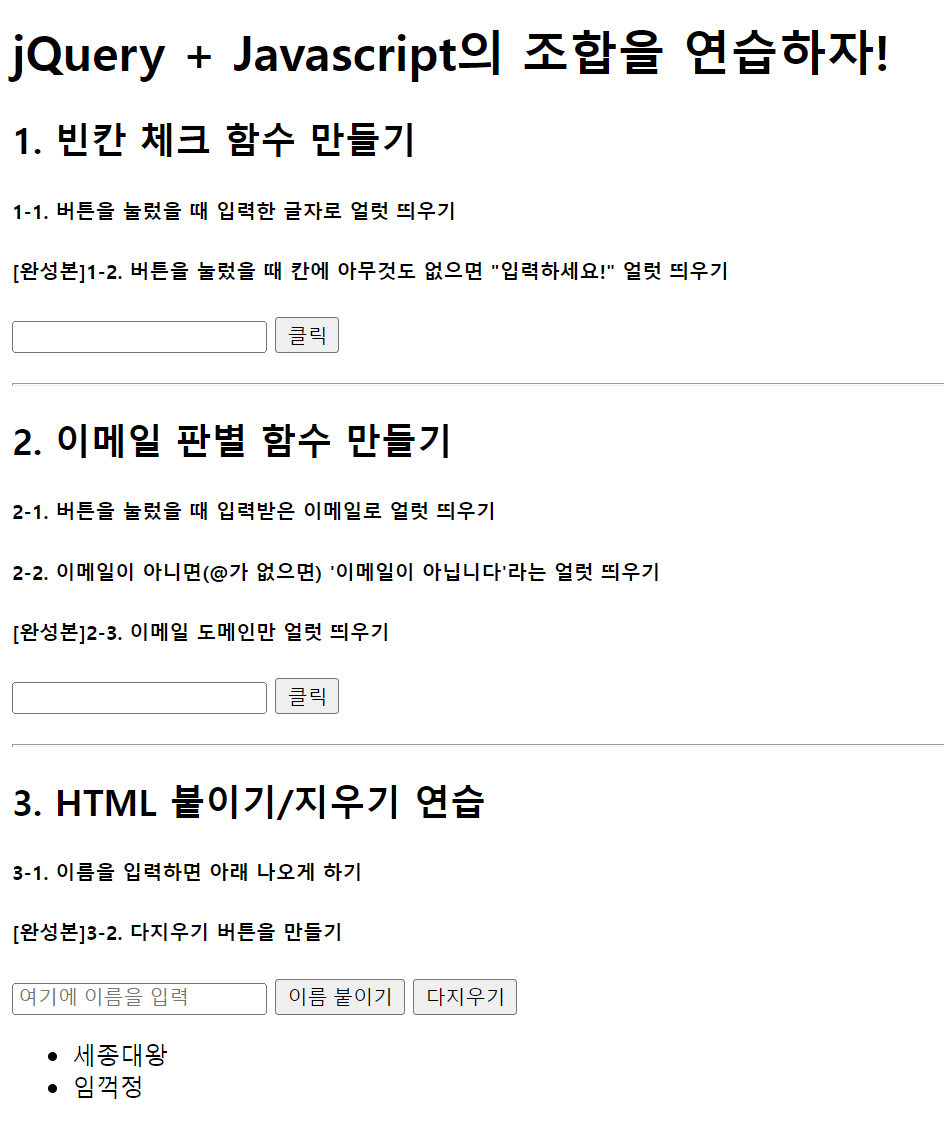
- 특정 데이터의 값 불러오기 및 조정, 변경하기
<!doctype html>
<html lang="ko">

<head>
<meta charset="UTF-8">
<title>jQuery 연습하고 가기!</title>

<!-- JQuery를 import 합니다 -->
<script src="https://ajax.googleapis.com/ajax/libs/jquery/3.4.1/jquery.min.js"></script>

<style type="text/css">
div.question-box {
margin: 10px 0 20px 0;
}
</style>

<script>
function q1() {
    q1_val = $('#input-q1').val()
    if( q1_val ==''){
        alert('입력하세요!')
    }else{
        alert(q1_val)
    }
}

function q2() {
    q2_val = $('#input-q2').val()
    if(q2_val.includes('@')){
        domain_val = q2_val.split('@')
        alert(domain_val[1])
    }else{
        alert('이메일이 아닙니다.')
    }
}

function q3() {
    let txt = $('#input-q3').val()
    let temp_html = `<li>${txt}</li>`
    $('#names-q3').append(temp_html)
}

function q3_remove() {
    $('#names-q3').empty()
}

</script>

</head>

<body>
<h1>jQuery + Javascript의 조합을 연습하자!</h1>

<div class="question-box">
<h2>1. 빈칸 체크 함수 만들기</h2>
<h5>1-1. 버튼을 눌렀을 때 입력한 글자로 얼럿 띄우기</h5>
<h5>[완성본]1-2. 버튼을 눌렀을 때 칸에 아무것도 없으면 "입력하세요!" 얼럿 띄우기</h5>
<input id="input-q1" type="text" /> <button onclick="q1()">클릭</button>
</div>
<hr />
<div class="question-box">
<h2>2. 이메일 판별 함수 만들기</h2>
<h5>2-1. 버튼을 눌렀을 때 입력받은 이메일로 얼럿 띄우기</h5>
<h5>2-2. 이메일이 아니면(@가 없으면) '이메일이 아닙니다'라는 얼럿 띄우기</h5>
<h5>[완성본]2-3. 이메일 도메인만 얼럿 띄우기</h5>
<input id="input-q2" type="text" /> <button onclick="q2()">클릭</button>
</div>
<hr />
<div class="question-box">
<h2>3. HTML 붙이기/지우기 연습</h2>
<h5>3-1. 이름을 입력하면 아래 나오게 하기</h5>
<h5>[완성본]3-2. 다지우기 버튼을 만들기</h5>
<input id="input-q3" type="text" placeholder="여기에 이름을 입력" />
<button onclick="q3()">이름 붙이기</button>
<button onclick="q3_remove()">다지우기</button>
<ul id="names-q3">
<li>세종대왕</li>
<li>임꺽정</li>
</ul>
</div>
</body>

</html>
[ 서버 - 클라이언트 통신 이해하기 ]
- 서버 -> 클라이언트: "JSON"을 이해하기
서울시 OpenAPI에 접속해보기
http://openapi.seoul.go.kr:8088/6d4d776b466c656533356a4b4b5872/json/RealtimeCityAir/1/99
크롬 익스텐션 JSONVue 설치
https://chrome.google.com/webstore/detail/jsonview/chklaanhfefbnpoihckbnefhakgolnmc?hl=ko
JSONVue
Validate and view JSON documents
chrome.google.com
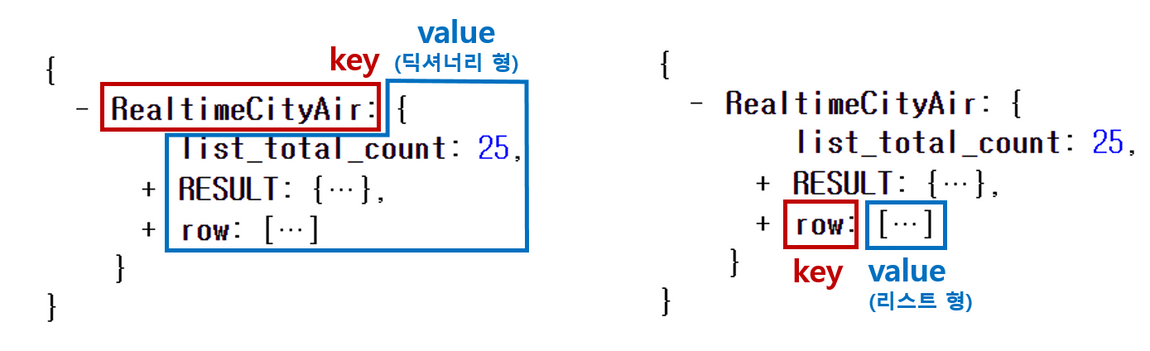
JSON 데이터 타입은 Key:Value로 이루어져 있음. python 자료형 중 dictionary와 유사
- 클라이언트 -> 서버 : GET 요청 이해하기
클라이언트가 요청 할 때, "타입"이라는 것이 존재.
* GET → 통상적으로! 데이터 조회(Read)를 요청할 때
예) 영화 목록 조회
* POST → 통상적으로! 데이터 생성(Create), 변경(Update), 삭제(Delete) 요청 할 때
예) 회원가입, 회원탈퇴, 비밀번호 수정
https://movie.naver.com/movie/bi/mi/basic.nhn?code=161967
기생충
전원백수로 살 길 막막하지만 사이는 좋은 기택(송강호) 가족.장남 기우(최우식)에게 명문대생 친구가 ...
movie.naver.com
https://movie.naver.com/movie/bi/mi/basic.nhn?code=161967

위 주소는 크게 두 부분으로 쪼개집니다. 바로 "?"가 쪼개지는 지점인데요.
"?" 기준으로 앞부분이 <서버 주소>, 뒷부분이 [영화 번호] 입니다.

* 서버 주소: https://movie.naver.com/movie/bi/mi/basic.nhn
* 영화 정보: code=161967
GET 방식으로 데이터를 전달하는 방법
? : 여기서부터 전달할 데이터가 작성된다는 의미
& : 전달할 데이터가 더 있다는 뜻입니다.
예시) google.com/search?q=아이폰&sourceid=chrome&ie=UTF-8
위 주소는 google.com의 search 창구에 다음 정보를 전달합니다!
q=아이폰 (검색어) sourceid=chrome (브라우저 정보) ie=UTF-8 (인코딩 정보)
[ Ajax 시작하기 ]
- Ajax 시작하기
서울시 미세먼지 OpenAPI 링크
http://spartacodingclub.shop/sparta_api/seoulair
Ajax 기본 골격 확인
$.ajax({
  type: "GET",
  url: "여기에URL을입력",
  data: {},
  success: function(response){
    console.log(response)
  }
})
Ajax 기본 골격 설명
$.ajax({
  type: "GET", // GET 방식으로 요청한다.
  url: "http://spartacodingclub.shop/sparta_api/seoulair",
  data: {}, // 요청하면서 함께 줄 데이터 (GET 요청시엔 비워두세요)
  success: function(response){ // 서버에서 준 결과를 response라는 변수에 담음
    console.log(response) // 서버에서 준 결과를 이용해서 나머지 코드를 작성
  }
})
$ajax 코드 상세 설명
type: "GET" → GET 방식으로 요청한다.
url: 요청할 url
data: 요청하면서 함께 줄 데이터 (GET 요청시엔 비워두세요)
POST 요청은, data : {} 에 넣어서 데이터를 가져갑니다.
data: { param: 'value', param2: 'value2' },
리마인드
GET 요청은, url뒤에 아래와 같이 붙여서 데이터를 가져갑니다.
http://naver.com?param=value¶m2=value2
success: 성공하면, response 값에 서버의 결과 값을 담아서 함수를 실행한다.
결과가 어떻게 response에 들어가나요? → 상세 설명은 다음에...
- Ajax 통신의 결과값을 이용해보기
위에서 했던 Ajax 통신을 발전시켜볼게요!
$.ajax({
  type: "GET", // GET 방식으로 요청한다.
  url: "http://spartacodingclub.shop/sparta_api/seoulair",
  data: {}, // 요청하면서 함께 줄 데이터 (GET 요청시엔 비워두세요)
  success: function(response){ // 서버에서 준 결과를 response라는 변수에 담음
    console.log(response) // 서버에서 준 결과를 이용해서 나머지 코드를 작성
  }
})
크롬 개발자도구에서 요청 결과 확인
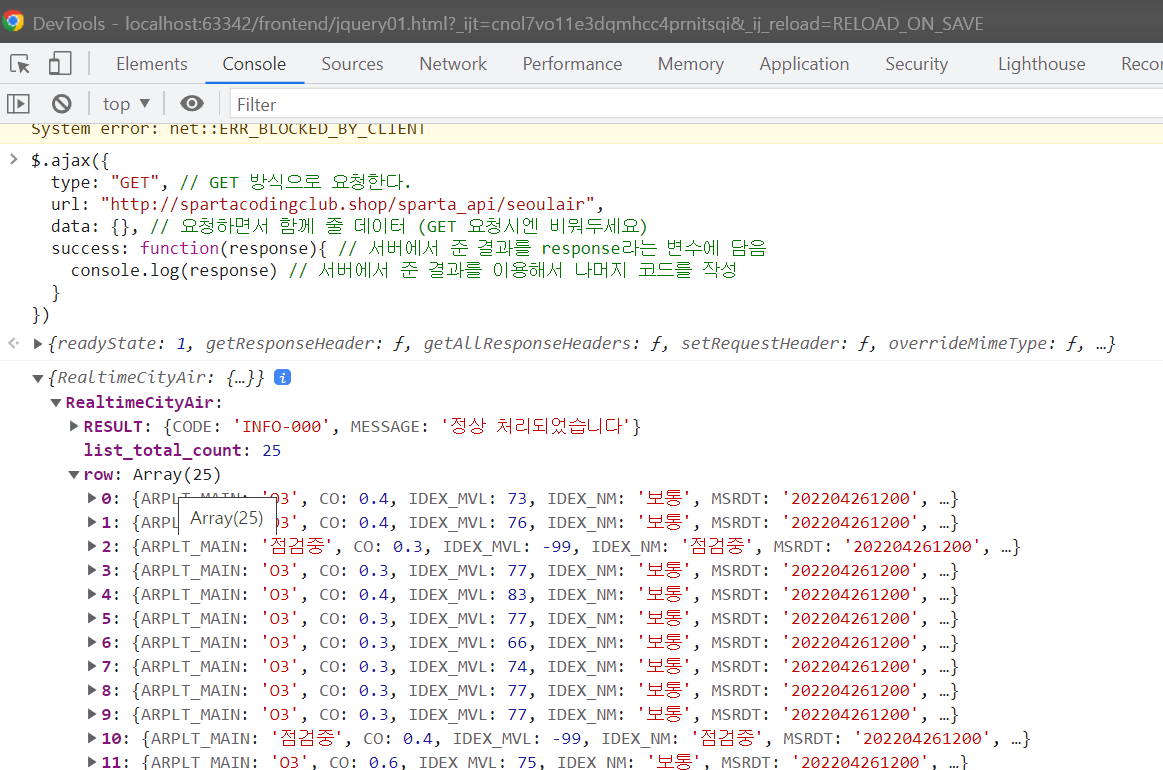
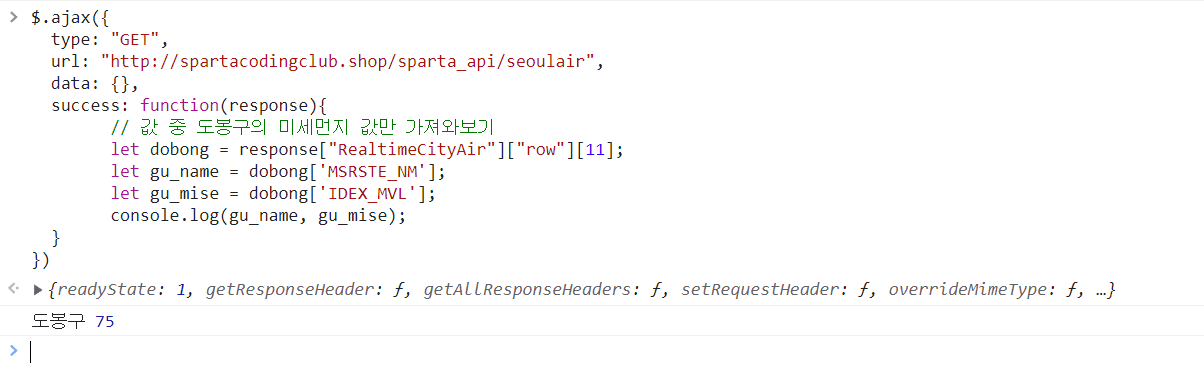
도봉구의 미세먼지 값만 확인하기
$.ajax({
  type: "GET",
  url: "http://spartacodingclub.shop/sparta_api/seoulair",
  data: {},
  success: function(response){
		// 값 중 도봉구의 미세먼지 값만 가져와보기
		let dobong = response["RealtimeCityAir"]["row"][11];
		let gu_name = dobong['MSRSTE_NM'];
		let gu_mise = dobong['IDEX_MVL'];
		console.log(gu_name, gu_mise);
  }
})
도봉구의 미세먼지 값만 확인하기 결과
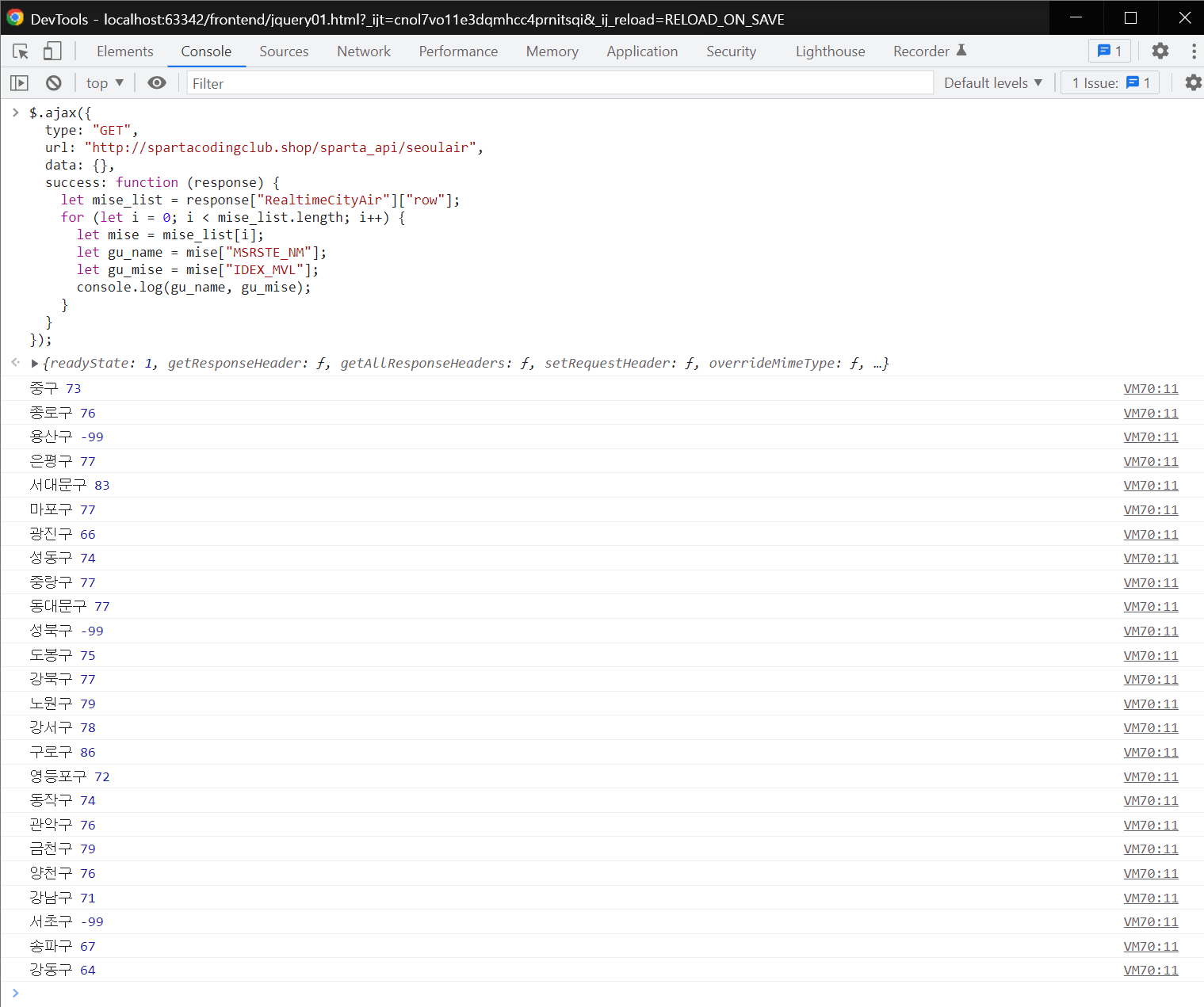
모든구의 미세먼지 값만 확인하기
$.ajax({
  type: "GET",
  url: "http://spartacodingclub.shop/sparta_api/seoulair",
  data: {},
  success: function (response) {
    let mise_list = response["RealtimeCityAir"]["row"];
    for (let i = 0; i < mise_list.length; i++) {
      let mise = mise_list[i];
      let gu_name = mise["MSRSTE_NM"];
      let gu_mise = mise["IDEX_MVL"];
      console.log(gu_name, gu_mise);
    }
  }
});
모든구의 미세먼지 값만 확인하기 결과
[ Ajax 함께 연습하기 ]
- 서울시 OpenAPI(실시간 미세먼지 상태)를 이용하기 - Ajax 기본 골격
$.ajax({
  type: "GET",
  url: "여기에URL을입력",
  data: {},
  success: function(response){
    console.log(response)
  }
})
- 서울시 OpenAPI(실시간 미세먼지 상태)를 이용하기 - 미세먼지 OpenAPI
http://spartacodingclub.shop/sparta_api/seoulair
- 서울시 OpenAPI(실시간 미세먼지 상태)를 이용하기 - Ajax 연습
파이참의 작업영역에서 신규 html 파일을 생성하고, ajax01.html 파일을 생성한 뒤 아래의 코드를 사용한다.
<!doctype html>
<html lang="ko">

<head>
    <meta charset="UTF-8">
    <title>jQuery 연습하고 가기!</title>

    <!-- jQuery를 import 합니다 -->
    <script src="https://ajax.googleapis.com/ajax/libs/jquery/3.4.1/jquery.min.js"></script>

    <style type="text/css">
        div.question-box {
            margin: 10px 0 20px 0;
        }
    </style>

    <script>
        function q1() {
            // 여기에 코드를 입력하세요
        }
    </script>

</head>

<body>
    <h1>jQuery+Ajax의 조합을 연습하자!</h1>

    <hr />

    <div class="question-box">
        <h2>1. 서울시 OpenAPI(실시간 미세먼지 상태)를 이용하기</h2>
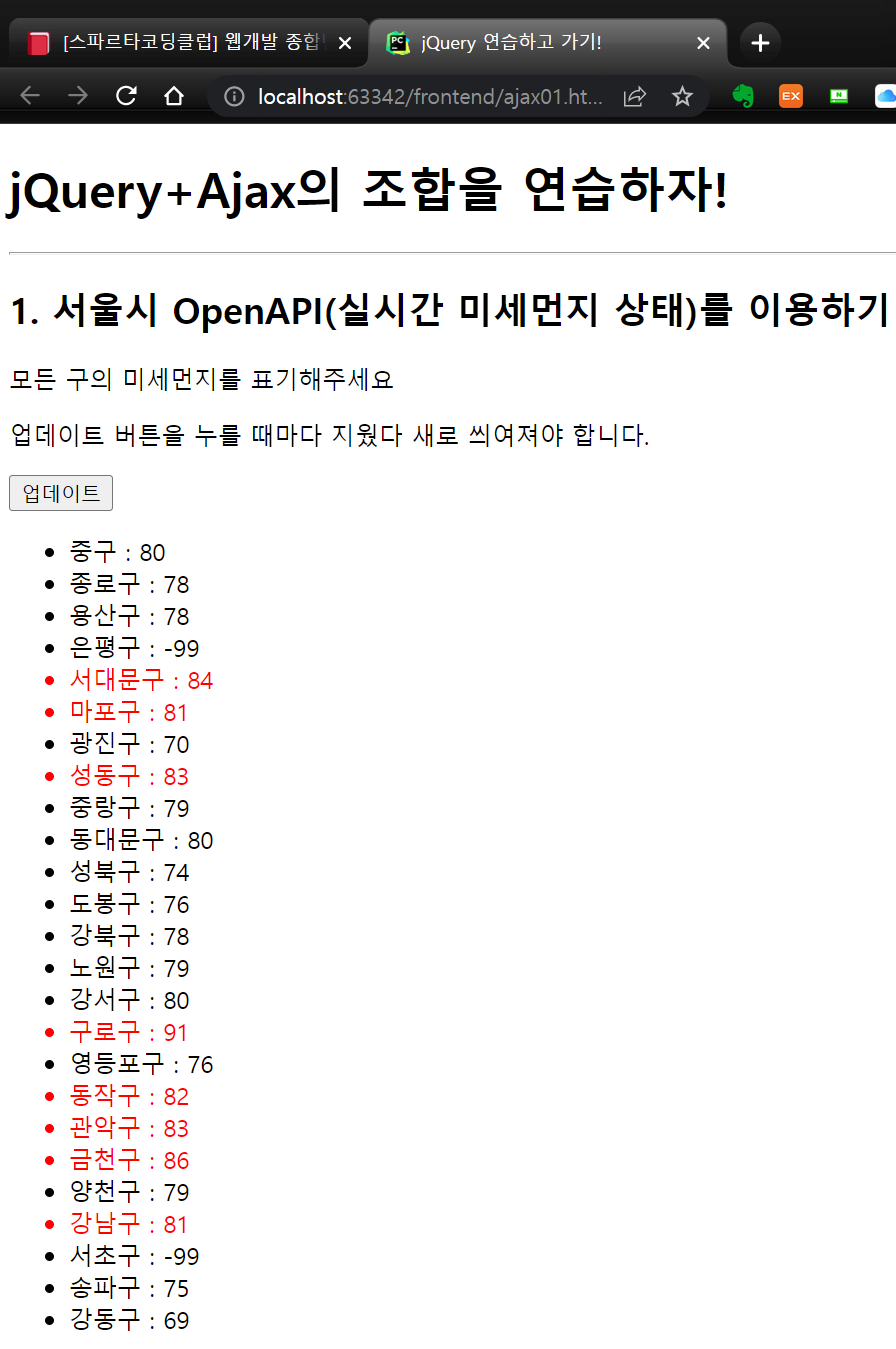
        <p>모든 구의 미세먼지를 표기해주세요</p>
        <p>업데이트 버튼을 누를 때마다 지웠다 새로 씌여져야 합니다.</p>
        <button onclick="q1()">업데이트</button>
        <ul id="names-q1">
            <li>중구 : 82</li>
            <li>종로구 : 87</li>
            <li>용산구 : 84</li>
            <li>은평구 : 82</li>
        </ul>
    </div>
</body>

</html>
- 서울시 OpenAPI(실시간 미세먼지 상태)를 이용하기 - Ajax 연습(보기)
http://spartacodingclub.shop/ajaxquiz/01
JQuery 연습하고 가기!
1. 서울시 OpenAPI(실시간 미세먼지 상태)를 이용하기 모든 구의 미세먼지를 표기해주세요 업데이트 버튼을 누를 때마다 지웠다 새로 씌여져야 합니다. 업데이트
spartacodingclub.shop
- 서울시 OpenAPI(실시간 미세먼지 상태)를 이용하기 - Ajax 연습(완성)
<!doctype html>
<html lang="ko">

<head>
    <meta charset="UTF-8">
    <title>jQuery 연습하고 가기!</title>

    <!-- jQuery를 import 합니다 -->
    <script src="https://ajax.googleapis.com/ajax/libs/jquery/3.4.1/jquery.min.js"></script>

    <style type="text/css">
        div.question-box {
            margin: 10px 0 20px 0;
        }
    </style>

    <script>
        function q1() {
            // 여기에 코드를 입력하세요
            $('#names-q1').empty();
            $.ajax({
                type: "GET",
                url: "http://spartacodingclub.shop/sparta_api/seoulair",
                data: {},
                success: function (response) {
                    let rows = response["RealtimeCityAir"]["row"];
                    for (let i = 0; i < rows.length; i++) {
                        let gu_name = rows[i]['MSRSTE_NM'];
                        let gu_mise = rows[i]['IDEX_MVL'];
                        let temp_html = `<li>${gu_name} : ${gu_mise}</li>`
                        $('#names-q1').append(temp_html);
                    }
                }
            })
        }
    </script>

</head>

<body>
    <h1>jQuery+Ajax의 조합을 연습하자!</h1>

    <hr />

    <div class="question-box">
        <h2>1. 서울시 OpenAPI(실시간 미세먼지 상태)를 이용하기</h2>
        <p>모든 구의 미세먼지를 표기해주세요</p>
        <p>업데이트 버튼을 누를 때마다 지웠다 새로 씌여져야 합니다.</p>
        <button onclick="q1()">업데이트</button>
        <ul id="names-q1">
        </ul>
    </div>
</body>

</html>
- 서울시 OpenAPI(실시간 미세먼지 상태)를 이용하기 - Ajax 연습(완성 - 한걸음더)
<!doctype html>
<html lang="ko">

<head>
    <meta charset="UTF-8">
    <title>jQuery 연습하고 가기!</title>

    <!-- jQuery를 import 합니다 -->
    <script src="https://ajax.googleapis.com/ajax/libs/jquery/3.4.1/jquery.min.js"></script>

    <style type="text/css">
        div.question-box {
            margin: 10px 0 20px 0;
        }
        .bad {
            color: red;
            font-weight: bold;
        }
    </style>

    <script>
        function q1() {
            // 여기에 코드를 입력하세요
            $('#names-q1').empty();
            $.ajax({
                type: "GET",
                url: "http://spartacodingclub.shop/sparta_api/seoulair",
                data: {},
                success: function (response) {
                    let rows = response["RealtimeCityAir"]["row"];
                    for (let i = 0; i < rows.length; i++) {
                        let gu_name = rows[i]['MSRSTE_NM'];
                        let gu_mise = rows[i]['IDEX_MVL'];

                        let temp_html = ''

                        if (gu_mise > 70) {
                            temp_html = `<li class="bad">${gu_name} : ${gu_mise}</li>`
                        } else {
                            temp_html = `<li>${gu_name} : ${gu_mise}</li>`
                        }

                        $('#names-q1').append(temp_html);
                    }
                }
            })
        }
    </script>

</head>

<body>
    <h1>jQuery+Ajax의 조합을 연습하자!</h1>

    <hr />

    <div class="question-box">
        <h2>1. 서울시 OpenAPI(실시간 미세먼지 상태)를 이용하기</h2>
        <p>모든 구의 미세먼지를 표기해주세요</p>
        <p>업데이트 버튼을 누를 때마다 지웠다 새로 씌여져야 합니다.</p>
        <button onclick="q1()">업데이트</button>
        <ul id="names-q1">
        </ul>
    </div>
</body>

</html>
- 서울시 OpenAPI(실시간 미세먼지 상태)를 이용하기 - Ajax 연습(완성 - 한걸음더) 결과보기
[ Quiz_Ajax 연습하기(1) ]
- 서울시 OpenAPI(실시간 따릉이 현황)을 이용하기 - 따릉이 OpenAPI
http://spartacodingclub.shop/sparta_api/seoulbike
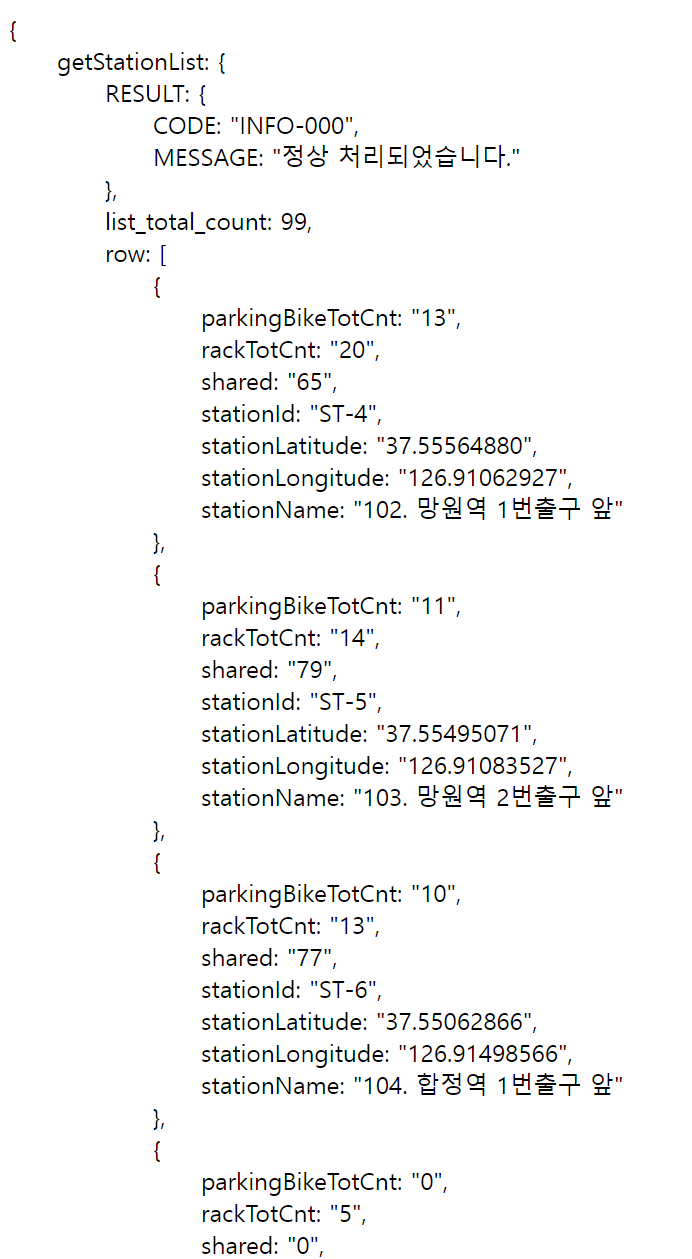
- 서울시 OpenAPI(실시간 따릉이 현황)을 이용하기 - Ajax 퀴즈 1
테스트를 위한 최초 코드
<!doctype html>
<html lang="ko">

<head>
    <meta charset="UTF-8">
    <title>JQuery 연습하고 가기!</title>
    <!-- JQuery를 import 합니다 -->
    <script src="https://ajax.googleapis.com/ajax/libs/jquery/3.4.1/jquery.min.js"></script>

    <style type="text/css">
        div.question-box {
            margin: 10px 0 20px 0;
        }

        table {
            border: 1px solid;
            border-collapse: collapse;
        }

        td,
        th {
            padding: 10px;
            border: 1px solid;
        }
    </style>

    <script>
        function q1() {
            // 여기에 코드를 입력하세요
        }
    </script>

</head>

<body>
    <h1>jQuery + Ajax의 조합을 연습하자!</h1>

    <hr />

    <div class="question-box">
        <h2>2. 서울시 OpenAPI(실시간 따릉기 현황)를 이용하기</h2>
        <p>모든 위치의 따릉이 현황을 보여주세요</p>
        <p>업데이트 버튼을 누를 때마다 지웠다 새로 씌여져야 합니다.</p>
        <button onclick="q1()">업데이트</button>
        <table>
            <thead>
                <tr>
                    <td>거치대 위치</td>
                    <td>거치대 수</td>
                    <td>현재 거치된 따릉이 수</td>
                </tr>
            </thead>
            <tbody id="names-q1">
                <tr>
                    <td>102. 망원역 1번출구 앞</td>
                    <td>22</td>
                    <td>0</td>
                </tr>
                <tr>
                    <td>103. 망원역 2번출구 앞</td>
                    <td>16</td>
                    <td>0</td>
                </tr>
                <tr>
                    <td>104. 합정역 1번출구 앞</td>
                    <td>16</td>
                    <td>0</td>
                </tr>
            </tbody>
        </table>
    </div>
</body>

</html>
- 서울시 OpenAPI(실시간 따릉이 현황)을 이용하기 - Ajax 퀴즈1(보기1)
http://spartacodingclub.shop/ajaxquiz/02_1
- 서울시 OpenAPI(실시간 따릉이 현황)을 이용하기 - Ajax 퀴즈1(완성1)
<!doctype html>
<html lang="ko">

<head>
    <meta charset="UTF-8">
    <title>jQuery 연습하고 가기!</title>
    <!-- jQuery를 import 합니다 -->
    <script src="https://ajax.googleapis.com/ajax/libs/jquery/3.4.1/jquery.min.js"></script>

    <style type="text/css">
        div.question-box {
            margin: 10px 0 20px 0;
        }

        table {
            border: 1px solid;
            border-collapse: collapse;
        }

        td,
        th {
            padding: 10px;
            border: 1px solid;
        }
    </style>

    <script>
        function q1() {
            $('#names-q1').empty();
            $.ajax({
                type: "GET",
                url: "http://spartacodingclub.shop/sparta_api/seoulbike",
                data: {},
                success: function (response) {
                    let rows = response["getStationListHist"]["row"];
                    for (let i = 0; i < rows.length; i++) {
                        let rack_name = rows[i]['stationName'];
                        let rack_cnt = rows[i]['rackTotCnt'];
                        let bike_cnt = rows[i]['parkingBikeTotCnt'];
                        let temp_html = `<tr>
                                            <td>${rack_name}</td>
                                            <td>${rack_cnt}</td>
                                            <td>${bike_cnt}</td>
                                        </tr>`
                        $('#names-q1').append(temp_html);
                    }
                }
            })
        }
    </script>

</head>

<body>
    <h1>jQuery +Ajax의 조합을 연습하자!</h1>

    <hr />

    <div class="question-box">
        <h2>2. 서울시 OpenAPI(실시간 따릉이 현황)를 이용하기</h2>
        <p>모든 위치의 따릉이 현황을 보여주세요</p>
        <p>업데이트 버튼을 누를 때마다 지웠다 새로 씌여져야 합니다.</p>
        <button onclick="q1()">업데이트</button>
        <table>
            <thead>
                <tr>
                    <td>거치대 위치</td>
                    <td>거치대 수</td>
                    <td>현재 거치된 따릉이 수</td>
                </tr>
            </thead>
            <tbody id="names-q1">
            </tbody>
        </table>
    </div>
</body>

</html>
- 서울시 OpenAPI(실시간 따릉이 현황)을 이용하기 - Ajax 퀴즈1(보기2)
http://spartacodingclub.shop/ajaxquiz/02_2
- 서울시 OpenAPI(실시간 따릉이 현황)을 이용하기 - Ajax 퀴즈1(완성2)
현재 거치된 따릉이가 5대 미만인 경우에만 해당 row의 표현을 빨간 색으로 나타내기
<!doctype html>
<html lang="ko">

<head>
    <meta charset="UTF-8">
    <title>jQuery 연습하고 가기!</title>
    <!-- jQuery를 import 합니다 -->
    <script src="https://ajax.googleapis.com/ajax/libs/jquery/3.4.1/jquery.min.js"></script>

    <style type="text/css">
        div.question-box {
            margin: 10px 0 20px 0;
        }

        table {
            border: 1px solid;
            border-collapse: collapse;
        }

        td,
        th {
            padding: 10px;
            border: 1px solid;
        }

        .urgent {
            color: red;
            font-weight: bold;
        }
    </style>

    <script>
        function q1() {
            $('#names-q1').empty();
            $.ajax({
                type: "GET",
                url: "http://spartacodingclub.shop/sparta_api/seoulbike",
                data: {},
                success: function (response) {
                    let rows = response["getStationList"]["row"];
                    for (let i = 0; i < rows.length; i++) {
                        let rack_name = rows[i]['stationName'];
                        let rack_cnt = rows[i]['rackTotCnt'];
                        let bike_cnt = rows[i]['parkingBikeTotCnt'];
                        let temp_html = '';
                        if (bike_cnt < 5) {
                            temp_html = `<tr class="urgent">
                                <td>${rack_name}</td>
                                <td>${rack_cnt}</td>
                                <td>${bike_cnt}</td>
                              </tr>`
                        } else {
                            temp_html = `<tr>
                                <td>${rack_name}</td>
                                <td>${rack_cnt}</td>
                                <td>${bike_cnt}</td>
                              </tr>`
                        }
                        $('#names-q1').append(temp_html);
                    }
                }
            })
        }
    </script>

</head>

<body>
    <h1>jQuery+Ajax의 조합을 연습하자!</h1>

    <hr />

    <div class="question-box">
        <h2>2. 서울시 OpenAPI(실시간 따릉이 현황)를 이용하기</h2>
        <p>모든 위치의 따릉이 현황을 보여주세요</p>
        <p>업데이트 버튼을 누를 때마다 지웠다 새로 씌여져야 합니다.</p>
        <button onclick="q1()">업데이트</button>
        <table>
            <thead>
                <tr>
                    <td>거치대 위치</td>
                    <td>거치대 수</td>
                    <td>현재 거치된 따릉이 수</td>
                </tr>
            </thead>
            <tbody id="names-q1">
            </tbody>
        </table>
    </div>
</body>

</html>
[ Quiz_Ajax 연습하기(2) ]
- 랜덤 르탄이 API 이용하기 - 테스트 코드 API 이용하기
특정 ID 값을 가진 html 요소의 이미지 및 텍스트 바꾸기
이미지 바꾸기 : $("#아이디값").attr("src", 이미지URL);
텍스트 바꾸기 : $("#아이디값").text("바꾸고 싶은 텍스트");
- 랜덤 르탄이 API 이용하기 - 르탄이 API
http://spartacodingclub.shop/sparta_api/rtan
- 랜덤 르탄이 API 이용하기 - Ajax 퀴즈 2
<!doctype html>
<html lang="ko">
  <head>
    <meta charset="UTF-8">
    <title>JQuery 연습하고 가기!</title>
    <!-- JQuery를 import 합니다 -->
    <script src="https://ajax.googleapis.com/ajax/libs/jquery/3.4.1/jquery.min.js"></script>

    <style type="text/css">
      div.question-box {
        margin: 10px 0 20px 0;
      }
      div.question-box > div {
        margin-top: 30px;
      }

    </style>

    <script>
      function q1() {
        // 여기에 코드를 입력하세요
      }
    </script>

  </head>
  <body>
    <h1>JQuery+Ajax의 조합을 연습하자!</h1>

    <hr/>

    <div class="question-box">
      <h2>3. 르탄이 API를 이용하기!</h2>
      <p>아래를 르탄이 사진으로 바꿔주세요</p>
      <p>업데이트 버튼을 누를 때마다 지웠다 새로 씌여져야 합니다.</p>
      <button onclick="q1()">르탄이 나와</button>
      <div>
        <img id="img-rtan" width="300" src="http://spartacodingclub.shop/static/images/rtans/SpartaIcon11.png"/>
        <h1 id="text-rtan">나는 ㅇㅇㅇ하는 르탄이!</h1>
      </div>
    </div>
  </body>
</html>
- 랜덤 르탄이 API 이용하기 - Ajax 퀴즈 2(보기)
http://spartacodingclub.shop/ajaxquiz/08
- 랜덤 르탄이 API 이용하기 - Ajax 퀴즈 2(완성)
<!doctype html>
<html lang="ko">
  <head>
    <meta charset="UTF-8">
    <title>JQuery 연습하고 가기!</title>
    <!-- JQuery를 import 합니다 -->
    <script src="https://ajax.googleapis.com/ajax/libs/jquery/3.4.1/jquery.min.js"></script>

    <style type="text/css">
      div.question-box {
        margin: 10px 0 20px 0;
      }
      div.question-box > div {
        margin-top: 30px;
      }

    </style>

    <script>
      function q1() {
        $.ajax({
          type: "GET",
          url: "http://spartacodingclub.shop/sparta_api/rtan",
          data: {},
          success: function(response){
              let imgurl = response['url'];
              $("#img-rtan").attr("src", imgurl);

              let msg = response['msg'];
              $("#text-rtan").text(msg);
            }
          })
      }
    </script>

  </head>
  <body>
    <h1>JQuery+Ajax의 조합을 연습하자!</h1>

    <hr/>

    <div class="question-box">
      <h2>3. 르탄이 API를 이용하기!</h2>
      <p>아래를 르탄이 사진으로 바꿔주세요</p>
      <p>업데이트 버튼을 누를 때마다 지웠다 새로 씌여져야 합니다.</p>
      <button onclick="q1()">르탄이 나와</button>
      <div>
        <img id="img-rtan" width="300" src="http://spartacodingclub.shop/static/images/rtans/SpartaIcon11.png"/>
        <h1 id="text-rtan">나는 ㅇㅇㅇ하는 르탄이!</h1>
      </div>
    </div>
  </body>
</html>
[ 숙제 하기 ]
- 서울의 현재 온도값을 읽어와서 팬명록에 기록하기
http://spartacodingclub.shop/sparta_api/weather/seoul
웹페이지가 로딩이 완료되면 이라는 의미를 표현.
$(document).ready(function () {
     alert('다 로딩됐다!')
});
- 최종 숙제 코드
<!doctype html>
<html lang="en">

<head>
<meta charset="utf-8">
<meta name="viewport" content="width=device-width, initial-scale=1, shrink-to-fit=no">

<link href="https://cdn.jsdelivr.net/npm/bootstrap@5.0.2/dist/css/bootstrap.min.css" rel="stylesheet"
integrity="sha384-EVSTQN3/azprG1Anm3QDgpJLIm9Nao0Yz1ztcQTwFspd3yD65VohhpuuCOmLASjC" crossorigin="anonymous">
<script src="https://ajax.googleapis.com/ajax/libs/jquery/3.5.1/jquery.min.js"></script>
<script src="https://cdn.jsdelivr.net/npm/bootstrap@5.0.2/dist/js/bootstrap.bundle.min.js"
integrity="sha384-MrcW6ZMFYlzcLA8Nl+NtUVF0sA7MsXsP1UyJoMp4YLEuNSfAP+JcXn/tWtIaxVXM"
crossorigin="anonymous"></script>

<title>스파르타코딩클럽 | 부트스트랩 연습하기</title>
    <link href="https://fonts.googleapis.com/css2?family=Poor+Story&display=swap" rel="stylesheet">
    <style>
        * {
            font-family: 'Poor Story', cursive;
        }
        .mytitle {

            /*타이틀 구간의 높이를 250픽셀로 지정*/
            height: 250px;
            /*타이틀 구간의 넓이를 브라우저의 폭과 동일하게 100%로 사용*/
            width: 100%;

            /*항상 아래 세가지는 함께, 해당 오브젝트의 이미지를 특정 이미지로 채우고, 위치를 현재 있는 공간의 중앙으로 정렬함*/
            background-image: linear-gradient(0deg, rgba(0, 0, 0, 0.5), rgba(0, 0, 0, 0.5)), url("https://t1.daumcdn.net/cfile/tistory/991BBD335A1335EA23?download");
            background-position: center;
            background-size: cover;

            color: white;

            /*항상 아래 네가지는 함께..*/
            display: flex;
            flex-direction: column; /*colume 대신 row를 할 경우 오른쪽에 이어서 contents가 붙게 됨.*/
            justify-content: center;
            align-items: center;
        }

        .wrap {
            max-width: 500px;
            width: 95%;
            margin: 20px auto 0px auto;
        }

        .mypost {
            max-width: 500px;
            width: 95%;

            margin: 20px auto 0px auto;

            box-shadow: 0px 0px 3px 0px gray;

            padding: 20px;
        }

        .mybtn {
            margin: 10px auto 10px auto;
            display: flex;
            flex-direction: row; /*colume 대신 row를 할 경우 오른쪽에 이어서 contents가 붙게 됨.*/
            justify-content: left;
            align-items: center;
        }

    </style>
    <script>
        // $(document).ready(function () {
        //     alert('다 로딩됐다!')
        // });
        function q1() {
            $.ajax({
                type: "GET",
                url: "http://spartacodingclub.shop/sparta_api/weather/seoul",
                data: {},
                success: function (response) {
                    let temp = response['temp']
                    $('#temp').text(temp)
                }
            })
        };
        q1();
    </script>
</head>

<body>
    <div class="mytitle">
        <h1>BTS(방탄소년단) 팬명록</h1>
        <p>현재 기온 : <span id="temp">00.00</span>도 </p>
    </div>

    <div class="mypost">
        <div class="form-floating mb-3">
            <input type="email" class="form-control" id="floatingInput" placeholder="name@example.com">
            <label for="floatingInput">닉네임</label>
        </div>
        <div class="form-floating">
            <textarea class="form-control" placeholder="Leave a comment here" id="floatingTextarea2"
                      style="height: 100px"></textarea>
            <label for="floatingTextarea2">응원댓글</label>
        </div>
        <div class="mybtn">
            <button type="button" class="btn btn-dark">응원남기기</button>
        </div>
    </div>
    <div class="wrap">
        <div class="row row-cols-1 row-cols-md-1 g-4">
            <div class="card">
                <div class="card-body">
                    <blockquote class="blockquote mb-0">
                        <p>새로운 앨범 너무 멋져요!</p>
                        <footer class="blockquote-footer">호빵맨 <cite title="Source Title"></cite></footer>
                    </blockquote>
                </div>
            </div>
            <div class="card">
                <div class="card-body">
                    <blockquote class="blockquote mb-0">
                        <p>새로운 앨범 너무 멋져요!</p>
                        <footer class="blockquote-footer">호빵맨 <cite title="Source Title"></cite></footer>
                    </blockquote>
                </div>
            </div>
            <div class="card">
                <div class="card-body">
                    <blockquote class="blockquote mb-0">
                        <p>새로운 앨범 너무 멋져요!</p>
                        <footer class="blockquote-footer">호빵맨 <cite title="Source Title"></cite></footer>
                    </blockquote>
                </div>
            </div>
        </div>
    </div>
</body>

</html>'ICT 학습' 카테고리의 다른 글
| 이미지 처리로 시작하는 딥러닝 - 3주차 (0) | 2022.04.26 |
|---|---|
| 머신러닝 기본부터 다시 배우기 - 3주차 (0) | 2022.04.26 |
| 이미지 처리로 시작하는 딥러닝 - 2주차 (0) | 2022.04.24 |
| 머신러닝 기본부터 다시 배우기 - 2주차 (0) | 2022.04.23 |
| 웹개발 종합반 - 1주차 (0) | 2022.04.17 |


